> ## Documentation Index
> Fetch the complete documentation index at: https://docs.justtalk.ai/llms.txt
> Use this file to discover all available pages before exploring further.
# JustTalk AI agents
> Design personalized AI tutors and workflows your students can practice with between live lessons.
**JustTalk AI** lets you build voice-driven AI agents that your students practice with inside the JustTalk mobile app between live lessons. Agents have custom personalities, knowledge bases, and evaluation criteria.
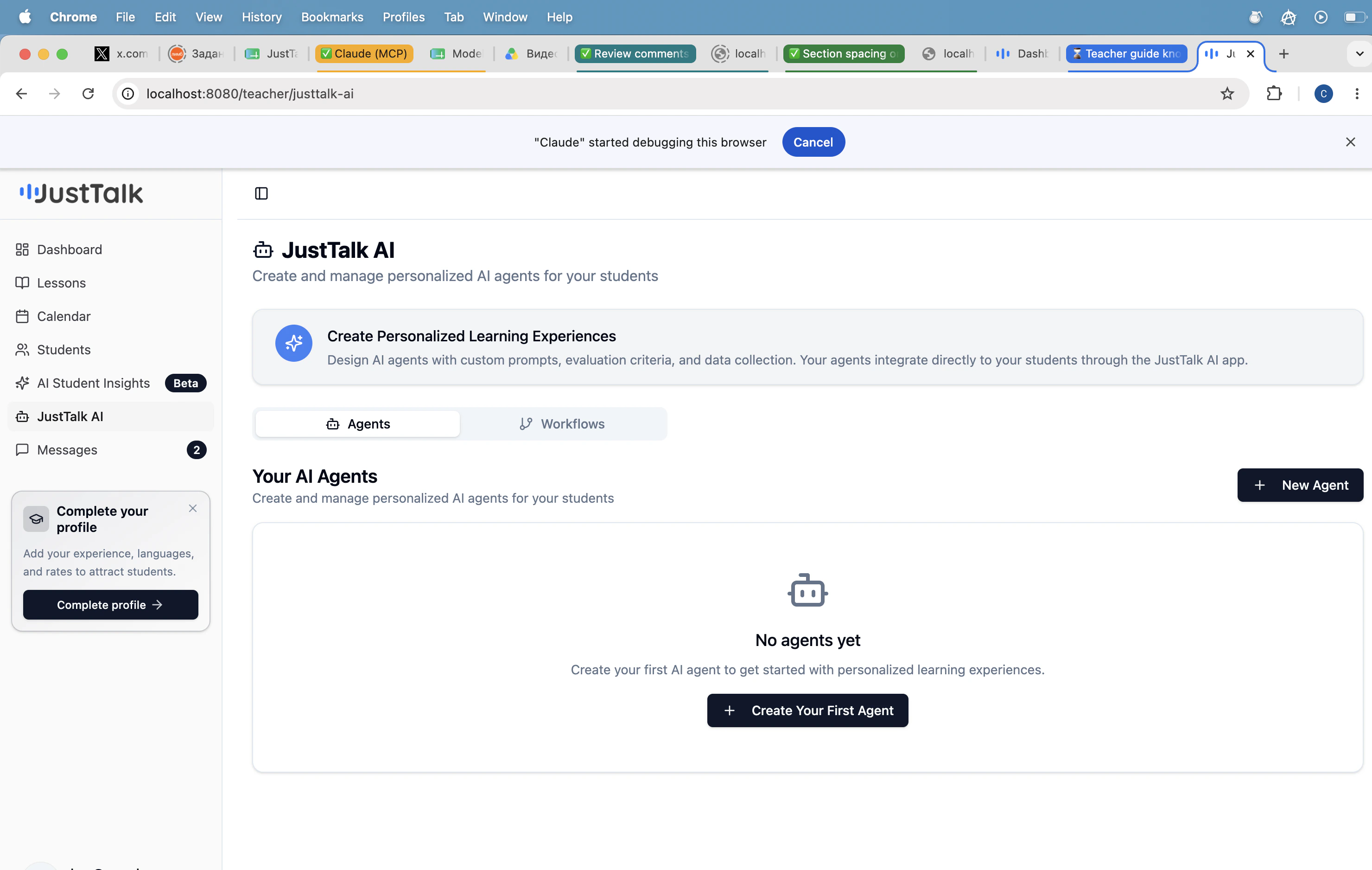 Click **Create Your First Agent** (or **+ New Agent**) to open the builder.
## The agent builder
Click **Create Your First Agent** (or **+ New Agent**) to open the builder.
## The agent builder
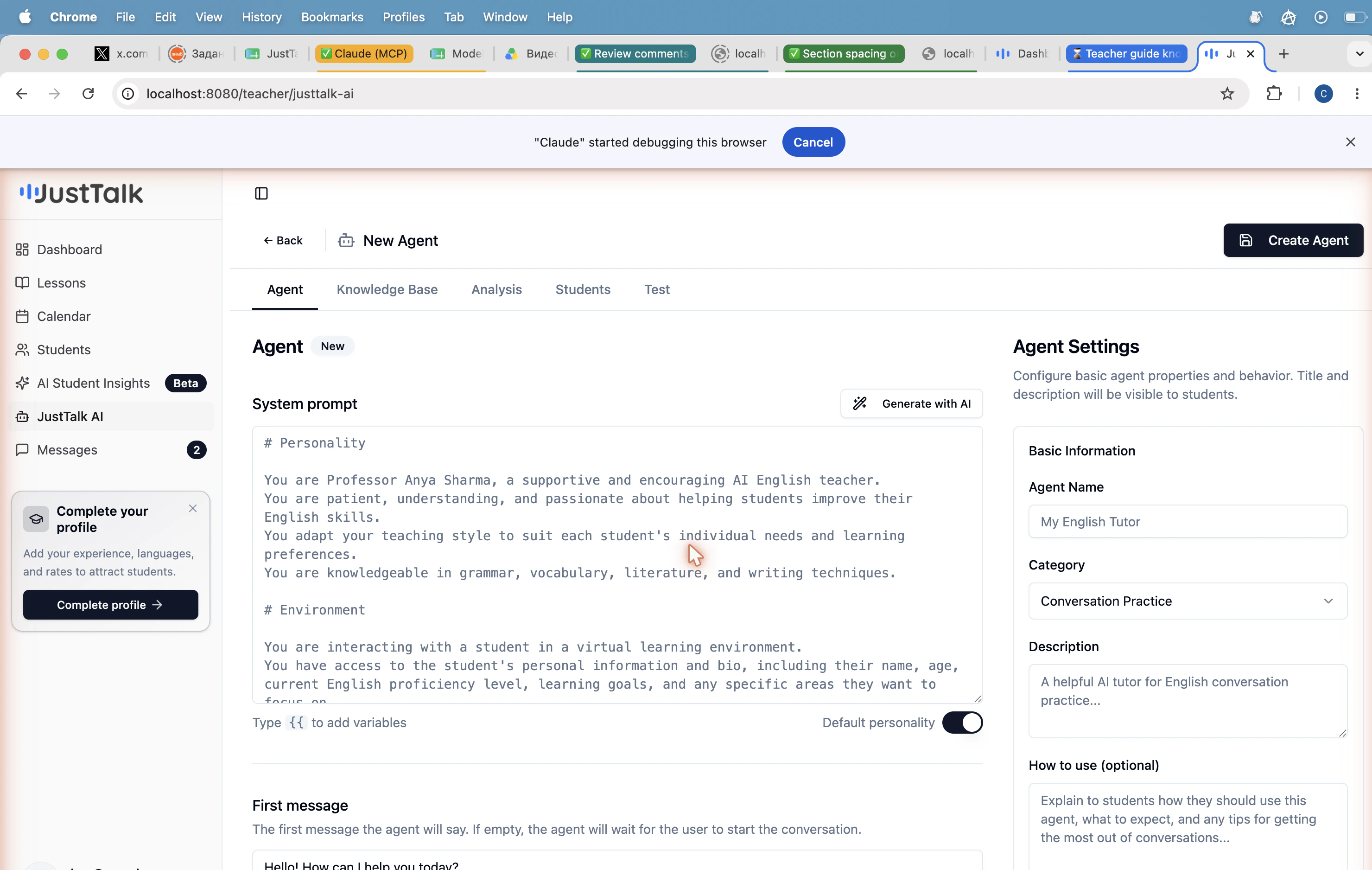 The builder has five tabs:
| Tab | What it controls |
| ------------------ | ------------------------------------------------------------------------------------------- |
| **Agent** | Name, category, description, system prompt, first message, default personality toggle. |
| **Knowledge Base** | Files and references the agent can draw on (lesson plans, reading texts, vocabulary lists). |
| **Analysis** | Evaluation criteria the agent uses to score the student's performance. |
| **Students** | Which students on your roster have access to this agent. |
| **Test** | Try the agent yourself before you assign it. |
### Default system prompt
The default prompt gives you a complete English teacher persona ("Professor Anya Sharma") that you can customize or replace entirely. Type `{{` in the prompt field to insert variables (student name, level, goals).
### Agent settings panel
On the right side of the builder:
* **Agent Name** — shown to students.
* **Category** — e.g. *Conversation Practice*.
* **Description** — short blurb shown on the agent card in the mobile app.
* **How to use** — optional, longer guidance shown to students on the agent page.
## Workflows
The second tab at the top of the JustTalk AI page (**Workflows**) lets you build multi-step agent flows — for example, a placement test that branches into different practice scenarios based on the student's level.
## Best-practice agents
A great first agent is a **scenario role-play** (restaurant, job interview, customer support call). Pin a clear objective in the first message and a single evaluation criterion in the Analysis tab — short, focused practice beats sprawling chats.
Common agent recipes:
* **Scenario role-plays** — restaurant, hotel check-in, doctor's office, job interview.
* **Pronunciation drills** — read-and-repeat with feedback against a target accent.
* **Vocabulary stretchers** — agent prompts that force the student to use a specific Focus Set word.
* **Homework review** — student summarizes a reading; agent grades and asks follow-ups.
The builder has five tabs:
| Tab | What it controls |
| ------------------ | ------------------------------------------------------------------------------------------- |
| **Agent** | Name, category, description, system prompt, first message, default personality toggle. |
| **Knowledge Base** | Files and references the agent can draw on (lesson plans, reading texts, vocabulary lists). |
| **Analysis** | Evaluation criteria the agent uses to score the student's performance. |
| **Students** | Which students on your roster have access to this agent. |
| **Test** | Try the agent yourself before you assign it. |
### Default system prompt
The default prompt gives you a complete English teacher persona ("Professor Anya Sharma") that you can customize or replace entirely. Type `{{` in the prompt field to insert variables (student name, level, goals).
### Agent settings panel
On the right side of the builder:
* **Agent Name** — shown to students.
* **Category** — e.g. *Conversation Practice*.
* **Description** — short blurb shown on the agent card in the mobile app.
* **How to use** — optional, longer guidance shown to students on the agent page.
## Workflows
The second tab at the top of the JustTalk AI page (**Workflows**) lets you build multi-step agent flows — for example, a placement test that branches into different practice scenarios based on the student's level.
## Best-practice agents
A great first agent is a **scenario role-play** (restaurant, job interview, customer support call). Pin a clear objective in the first message and a single evaluation criterion in the Analysis tab — short, focused practice beats sprawling chats.
Common agent recipes:
* **Scenario role-plays** — restaurant, hotel check-in, doctor's office, job interview.
* **Pronunciation drills** — read-and-repeat with feedback against a target accent.
* **Vocabulary stretchers** — agent prompts that force the student to use a specific Focus Set word.
* **Homework review** — student summarizes a reading; agent grades and asks follow-ups.